
Account Linking FAQ
How this works
Account linking lets you sign in with a platform account (Meta Quest, Steam or Pico) and associate it with one or more other platforms, creating a single identity. Once you have added two or more platform accounts, you can use cross-platform features (see instructions below).
You don't need a username, e-mail or password for the account linking system itself; simply use any of your platform accounts to sign in.
Sharing game profiles across platforms 🤝
When you have two or more platforms associated with each other, you can change their link status to affect which profile (game account) you are signed in to when playing Forefront on them:
Unlinked
This platform works as usual and isn't affected by the link state of other platforms (the default).
Primary
This profile will be active on its original platform and any other platforms you set as Linked.
Linked
When you play on this platform, you will be using your Primary account's profile instead. A notice is shown in the main menu when playing on a linked platform:
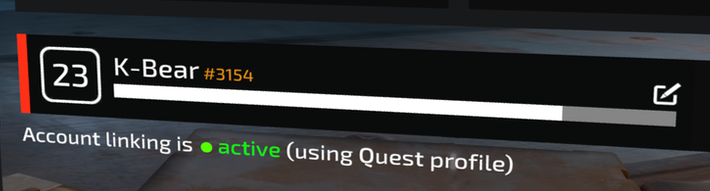
Account linking is reversible: you can always unlink a platform to restore its behavior.
Friend list 👫
The in-game friend list is tied to the platform you play on, and is not affected by account linking.
Supporter Pack DLC 🛍️
If I buy the Supporter Pack, do I get it on all my accounts?
Yes! Your DLC inventory is shared across all your primary and linked platforms, as long as one of them matches the platform store where you made the purchase. See also the related question below.
I bought the Supporter Pack DLC but it still shows as 'not owned'.
You'll need to start up Forefront at least once on the platform where you purchased the DLC. If you purchased the DLC outside the game (i.e. on the Meta or Steam web store) you may need to quit and restart the game.
Once you've signed in to the right platform the DLC will be available on all your linked or primary Forefront accounts.
Troubleshooting 💥
I've added a platform, how can I change its settings?
Platform settings can be changed by pressing the  menu button at the bottom right of the platform card.
When I add a second platform it says 'this account is already linked to a different user'.
This may happen if you signed in separately with the second platform before. For example: if you signed up with Meta, got signed out and now sign in with Steam — and then try to add Meta as a second platform, you are rejected.
In that case, first remove the platform you are now logged in with (Steam, in this example) and then log in again using the second platform (Meta, in this example). You can then add the other platform (e.g. Steam) to that account's identity.
I signed in with my platform credentials but it says 'Game profile not found'.
This means the platform account you signed in with is not the same one you are using on your headset to play the game. Make sure you are not accidentally signing in with a different account; try using Incognito/Private mode or a different browser if necessary.
I'm a member of Forefront Discord but this page says I'm not.
If you joined the game's Discord server after linking your accounts, you need to press the [OK, I joined the server!] button so we can get your updated membership status from Discord.
I get errors when trying to add my Discord account.
- "You need to verify your account in order to perform this action": This means you are already signed in to a different, unverified Discord account in your browser. Go to Discord in your browser, log out and log in again with the account you used to join the Breachers Discord server.
- "Discord SSO Error": This may happen on mobile if you link your account from within the mobile Discord app's in-app browser and it kicks you out to the default system browser after authenticating. The best way to avoid this is to open the account linking page in your default system browser (Chrome, Safari...) instead, or to use a desktop browser.
Frequently Asked Questions 🤔
Can I add multiple accounts for the same platform?
No, we don't support adding multiple platform accounts of the same type.
Which personal data am I sharing and how does it get used?
When you sign in with a platform account you only share a very minimal amount of information with us: a user ID, your handle and your profile picture. We do not get access to your real name, e-mail address or any other personally identifying information.
When you authenticate with Discord we also check your membership of the game's Discord server, and can receive status updates from Discord when you leave the server.
For more details, see our privacy policy.
How do I delete my account information?
To permanently delete the information you've shared with us, remove all the platform accounts you have added (using the button on the bottom right of the platform card).
This action will remove all the information you've shared with Triangle Factory from our backend, and restore your game profiles to their normal state. If you change your mind later, simply sign in again.
Support 🙋
If you're having issues and the troubleshooting section above didn't solve your problem, contact us through the support form.
Include the following information:
- Your support code, which you can retrieve below. This code stays the same, and is also shown on any error page you may run into.
- A step-by-step description of the actions you've taken and where it went wrong, including any error messages you may have received either in the browser or in-game.
- Your username/handle on the platform you're having issues with (only if the problem relates to platform sign-in).
- Your Discord handle (only if the problem relates to Discord linking).
Sign in to see your support code.
Support is provided in English only. Please allow 1-2 business days for us to get back to you.
Click here to go back.